
| University | University of Newcastle upon Tyne |
|---|---|
| Subject | EEE8089 M2M Technology IoT |
Part 1 of the practical coursework focuses on
- network architecture
- access from home
- design problems to solve
- (Part 2 in a separate lecture)
Three Architectures
Three main architectures are defined:
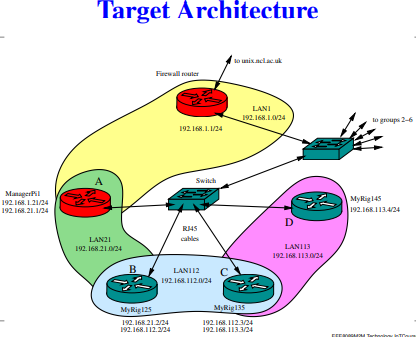
- Target Architecture—the main design effort
- Instrumental Architecture—pre-configured to provide access to the components of the design
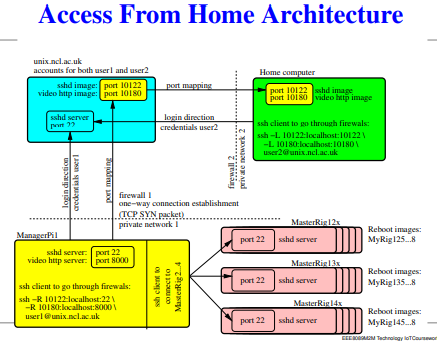
- Access From Home Architecture—a scheme for accessing the above two configurations remotely
Device Configuration
    Four RPi 3B+ devices, replace # with group number,
    multiple names for the devices with several OS images:

    ManagerPi#
    MasterRig#2x: MyRig#25, MyRig#26, MyRig#27, MyRig#28
    MasterRig#3x: MyRig#35, MyRig#36, MyRig#37, MyRig#38
    MasterRig#4x: MyRig#45, MyRig#46, MyRig#47, MyRig#48
    Note: the last three are often referred to as RigPi
Do You Need Assignment of This Question
IP Addresses for Groups
| Group | ManagerPi | MyRig#2i | MyRig#3i | MyRig#4i |
|---|---|---|---|---|
| 1 | 192.168.21.1 | 192.168.21.2 192.168.112.3 |
192.168.113.4 | 192.168.112.2 192.168.113.3 |
| 2 | 192.168.22.1 | 192.168.22.2 192.168.122.3 |
192.168.123.4 | 192.168.122.2 192.168.123.3 |
| 3 | 192.168.23.1 | 192.168.23.2 192.168.132.3 |
192.168.133.4 | 192.168.132.2 192.168.133.3 |
| 4 | 192.168.24.1 | 192.168.24.2 192.168.142.3 |
192.168.143.4 | 192.168.142.2 192.168.143.3 |
| 5 | 192.168.25.1 | 192.168.25.2 192.168.152.3 |
192.168.153.4 | 192.168.152.2 192.168.153.3 |
| 6 | 192.168.26.1 | 192.168.26.2 192.168.162.3 |
192.168.163.4 | 192.168.162.2 192.168.163.3 |
Tasks to Complete
- Find the IP addresses, define the LANs and determine which gateways to use.
- Configure the devices, test them, debug any problems.
- Test the connectivity: each device should be able to talk to any other and to www.
- Use tcpdmp to examine Ethernet, IP and TCP packets, find the key fields in the headers of these packets.
- Examine the latency and throughput of connections within one LAN, between two LANs and between three LANs.
- Generate and distribute SSH keys between the devices, so SSH sessions could be started without typing a password. Experiment with forwarding a data pipeline through SSH between two devices.
Instrumental Architecture
| Group | ManagerPi# | MasterRig#2x | MasterRig#3x | MasterRig#4x |
|---|---|---|---|---|
| Group 1 | 192.168.21.1 | 192.168.21.2 | 192.168.21.3 | 192.168.21.4 |
| Group 2 | 192.168.22.1 | 192.168.22.2 | 192.168.22.3 | 192.168.22.4 |
| Group 3 | 192.168.23.1 | 192.168.23.2 | 192.168.23.3 | 192.168.23.4 |
| Group 4 | 192.168.24.1 | 192.168.24.2 | 192.168.24.3 | 192.168.24.4 |
| Group 5 | 192.168.25.1 | 192.168.25.2 | 192.168.25.3 | 192.168.25.4 |
| Group 6 | 192.168.26.1 | 192.168.26.2 | 192.168.26.3 | 192.168.26.4 |
Using the Instrumental Architecture
- Get SSH access to ManagerPi# by using Access From Home Architecture.
- From ManagerPi access RigPi devices – they are running in MasterRig mode.
- Each MasterRig device can be logged in as user pi with provided password.
- The OS images of MyRig (four spares per device) are mounted as ~/rootfs5…8.
- Edit the chosen OS image, then reboot RigPi into this image (MyRig mode) by creating a file ~/boot_5 (or 6,7,8) and then rebooting the device.
- The next reboot will take you back into the MasterRig mode.
Instrumental Architecture IP Addresses
| Group | ManagerPi# | MasterRig#2x | MasterRig#3x | MasterRig#4x |
|---|---|---|---|---|
| Group 1 | 192.168.21.1 | 192.168.21.2 | 192.168.21.3 | 192.168.21.4 |
| Group 2 | 192.168.22.1 | 192.168.22.2 | 192.168.22.3 | 192.168.22.4 |
| Group 3 | 192.168.23.1 | 192.168.23.2 | 192.168.23.3 | 192.168.23.4 |
| Group 4 | 192.168.24.1 | 192.168.24.2 | 192.168.24.3 | 192.168.24.4 |
| Group 5 | 192.168.25.1 | 192.168.25.2 | 192.168.25.3 | 192.168.25.4 |
| Group 6 | 192.168.26.1 | 192.168.26.2 | 192.168.26.3 | 192.168.26.4 |
Buy Answer of This Assessment & Raise Your Grades
Hardware Reboot of MyRig
If the network connection to the MyRig fails, then hardware reboot is possible by issuing a command from ManagerPi.
Soft Reboot (for MyRig#2x device)
    echo 0 > /sys/class/gpio/gpio17/value
    echo 1 > /sys/class/gpio/gpio17/value
Hard Reboot (may cause filesystem corruption—try to avoid)
    echo 0 > /sys/class/gpio/gpio27/value
    echo 1 > /sys/class/gpio/gpio27/value
MyRig#2i: soft reboot gpio17, hard reboot gpio27
MyRig#3i: soft reboot gpio22, hard reboot gpio10
MyRig#4i: soft reboot gpio9, hard reboot gpio11
Using from Home
Everywhere below, replace # with your group number.
Set up the ssh tunnels to import the ports from unix.ncl.ac.uk
    Group #: 10#22, 10#80

Login into ManagerPi#
    ssh -Y -p 10#22 login_name@localhost

 View the video feed in the browser (tested with Firefox):
    http://localhost:1080
Are You Looking for Answer of This Assignment or Essay
If you are falling short of time left and searching for expert help for EEE8089 M2M IoT: Raspberry Pi Network & Remote Access Setup Assignment? Our team of professional diploma writers provides top-quality Diploma Assignment Help UK. Just write do my assignment, and your assignment will be completed on time. We are ensuring you get the best results on our affordable platform. Contact us today for a plagiarism-free solution. This will help you stand out from the rest with better grades.